New
Credential Architect

Credential Architect

Credential Architect is a free, portable desktop tool designed to simplify bulk voucher and credential generation. Load your CSV data, customize layouts and branding, and export high-quality PDFs in seconds β€” no installation, no internet, no complexity.

Credential Architect
Latest Release:June 30th, 2026
Tech:Python
Status:Web App

Credential Architect

Credential Architect is a fast, lightweight, and user-friendly desktop application designed to generate large volumes of credentials, vouchers, or structured data outputs from CSV or Excel files β€” in seconds.

Built with simplicity and performance in mind, it eliminates the need for manual typing, complex setup processes, or technical expertise.


πŸš€ Overview

Credential Architect allows you to:

  • Import CSV or Excel files containing usernames, passwords, tokens, or any structured data
  • Select from multiple grid and layout configurations
  • Customize spacing, font size, and visual structure
  • Instantly generate high-quality PDF outputs
  • Handle thousands to tens of thousands of records with ease

Whether you’re generating internet vouchers, access cards, tickets, coupons, or bulk credentials for any system, Credential Architect gets the job done efficiently.


✨ Key Features

  • CSV & Excel Import

    • Load .csv and .xlsx files directly
    • Supports datasets with 10,000+ records
  • Multiple Grid Layouts

    • Choose layouts such as:
      • 1Γ—2, 2Γ—1, 2Γ—2, 2Γ—4, 4Γ—4, 5Γ—5 and more
    • Wide and compact layout options included
  • Typography & Spacing Controls

    • Adjust font size
    • Control line spacing
    • Fine-tune layout density for printing
  • Instant PDF Generation

    • Output professional, print-ready PDF files
    • Generation time:
      • Small layouts: fractions of a second
      • Large datasets (10,000 records): ~1 second (hardware dependent)
  • Cross-Platform

    • Available for:
      • Windows
      • Linux
  • Offline & Secure

    • No internet connection required
    • All data remains on your machine
  • Simple, Clean Interface

    • No complicated setup
    • No technical configuration required
    • Designed for non-technical users

🎯 Use Cases

Credential Architect is ideal for:

  • Internet voucher generation
  • Network access credentials
  • Event tickets and passes
  • School or organization access cards
  • Coupon and token generation
  • Any scenario requiring mass credential creation

πŸ’‘ Inspiration & Background

Credential Architect was inspired by a real-world challenge faced by our first client:

Paviona, represented by Mr. Vincent Kurauvone, was manually typing thousands of vouchers by hand β€” directly from CSV data exported from a MikroTik router.

This process was:

  • Time-consuming
  • Error-prone
  • Physically exhausting

While tools like Mikhmon exist, they require technical knowledge and complex setup.

Credential Architect was created to be:

  • Free
  • Easy to use
  • Accessible to anyone

As long as you can export your data (usernames, passwords, tokens) to a CSV or Excel file, you can load it directly into Credential Architect and generate outputs instantly.


πŸ“¦ What’s Included

Each release package includes:

  • The Credential Architect application
  • Sample CSV and Excel files (including large datasets)
  • Sample generated PDF outputs
  • Application logo and assets
  • Platform-specific README and instructions
  • Desktop integration files (Linux)

Everything is bundled together for convenience.


πŸ–₯ Platform Notes

Windows

  • Extract the ZIP file
  • Run the executable
  • No installation required

Linux

  • Extract the ZIP file
  • Ensure the binary is executable
  • Double-click to launch
  • Optional desktop integration using the provided .desktop file

⚑ Performance

  • Handles thousands of records efficiently
  • Optimized layout rendering
  • Minimal system resource usage
  • Scales well even on modest hardware

πŸ”’ Licensing

Credential Architect is distributed under an open license (see LICENCE.txt in the release package for details).


🌐 Learn More

For documentation, updates, and additional tools, visit:

πŸ‘‰ https://arcetel.com


πŸ™ Acknowledgements

Special thanks to:

  • Paviona
  • Mr. Vincent Kurauvone

Your real-world challenges shaped this project into a practical, user-focused solution.


πŸ“¬ Feedback & Support

We welcome feedback, feature requests, and suggestions.

If you find Credential Architect useful, we’d love to hear from you.

Ready to get this product?

Screenshots

Credential Architect

Version History

v2.0.0Latest

June 30th, 2026

0 downloads

Credential Architect v2.0.0

Professional Credential Voucher Generator

Based in Zimbabwe, we craft world-class digital experiences that transcend borders.


What's New in v2.0.0

A complete ground-up rewrite. Every line of code is new. Below is everything that changed from v1.


Architecture

v1 (Old)v2 (New)
Single monolithic generate.py (~2235 lines)Modular Clean Architecture package (32 files, ~3200 lines)
No separation of concernsLayered: domain/ β†’ application/ β†’ presentation/ β†’ exporters/ β†’ importers/ β†’ infrastructure/
Hardcoded file paths everywherepathlib.Path + platformdirs for cross-platform config/logs
Tkinter GUIPySide6 (Qt6) GUI
Top tab navigationSide navigation bar with 6 panels
No threading β€” UI froze during generationQThread-based GenerateWorker β€” UI stays responsive

Themes & Visual Design

  • 30 PDF card colour themes organised by category:
    • Corporate: Dark Blue, Light Blue, Midnight, Forest, Grey, Sunset, Ocean
    • Nature: Emerald, Sakura, Sunflower, Lavender, Mint, Rose, Tropical
    • Dark & Moody: Charcoal, Deep Purple, Obsidian, Slate
    • Warm: Coral, Amber, Wine
    • Cool: Arctic, Sky, Teal
    • Bold & Vibrant: Electric, Neon, Fuchsia, Aurora
    • Minimal: Minimal Light, Minimal Dark
  • 7 Application UI themes that actually restyle the entire app (sidebar, inputs, tables, buttons, scrollbars via dynamic stylesheets): Dark Blue, Light, Midnight, Forest, Ocean, Sunset, Grey
  • Dark/Light mode β€” works correctly, switches the full UI stylesheet
  • Live colour pickers for brand, header, subtitle, footer, and card background colours

Font & Typography

  • 12 font families to choose from (Arial, Times, Courier, Verdana, Georgia, Trebuchet MS, Comic Sans MS, Impact, Lucida Console, Tahoma, Palatino)
  • Global bold labels toggle β€” bold all field labels in one click
  • Global bold values toggle β€” bold all field values in one click
  • Per-field font family β€” each mapped field and custom field can use its own font
  • Centralised font sizes β€” title, subtitle, field labels, field values, card footer, page footer β€” all controlled from Design panel
  • Per-field font family selector in the Data panel mapping rows

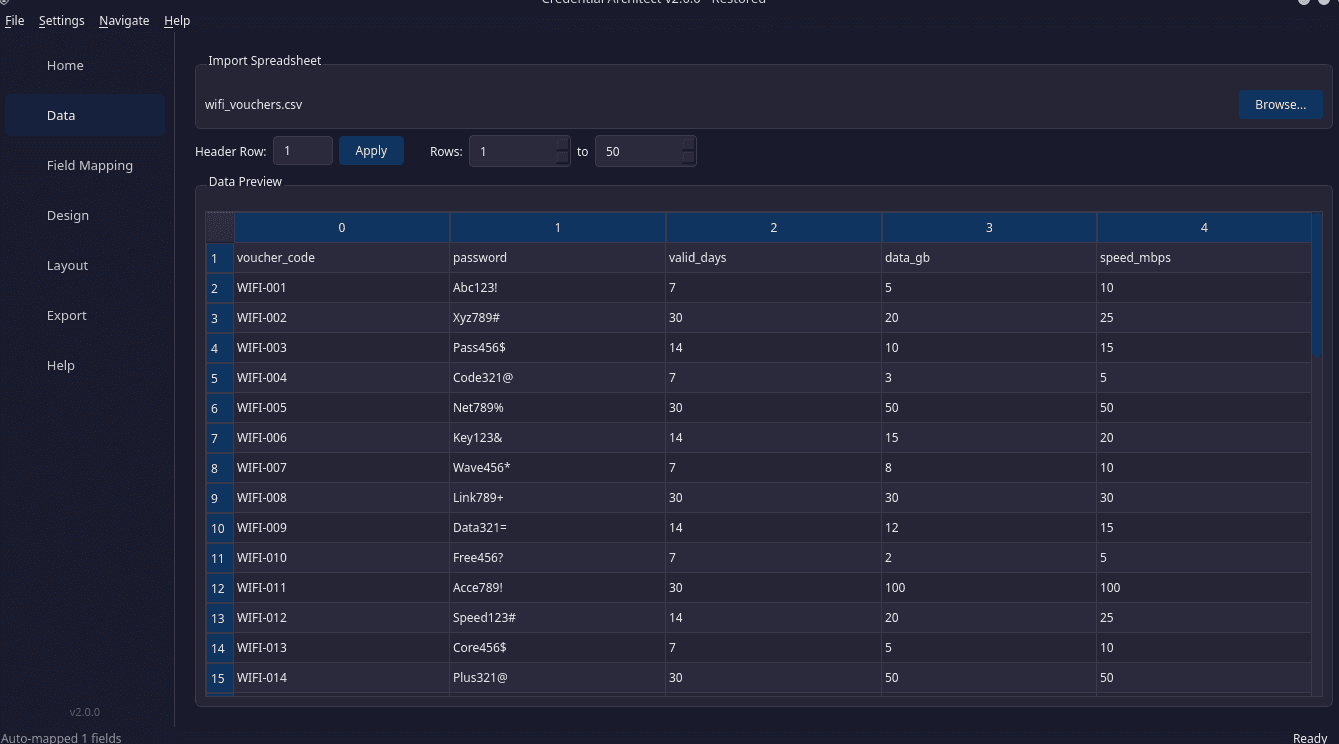
Data & Import

  • CSV and Excel import (.csv, .xlsx, .xls)
  • Header row selection β€” specify which row contains column names
  • Row range selection β€” spinboxes for start/end rows to export a subset
  • Live data preview table (first 50 rows)
  • Smart field mapping β€” type a label and it auto-suggests matching columns
  • Auto-map β€” one-click field-to-column mapping using alias dictionaries
  • 3 default fields (USERNAME, PASSWORD, ID) β€” enable/disable as needed

Custom Fields

  • Dynamic custom fields β€” add unlimited static fields (e.g. price, category, instructions)
  • Per-custom-field: label, value, font family, render order
  • Custom fields mix with mapped fields using the order system

Layout

  • 11 grid layouts: 2Γ—1, 1Γ—2, 2Γ—2, 2Γ—4, 4Γ—2, 2Γ—5, 5Γ—2, 4Γ—5, 5Γ—4, 4Γ—4, 5Γ—5
  • Live A4 preview β€” painted card grid overlay showing positions and card numbers
  • Real-time card dimension calculations

PDF Export

  • Non-blocking generation with progress bar (QThread + signals)
  • Footer lines β€” 3 configurable footer lines on each card
  • Page numbers β€” optional footer with page numbering
  • Footer note β€” optional custom note on every page
  • Card header with brand colour bar, optional logo, title, and subtitle
  • Per-card borders with rounded corners and brand accent line
  • "Open now?" prompt after generation with cross-platform file opener

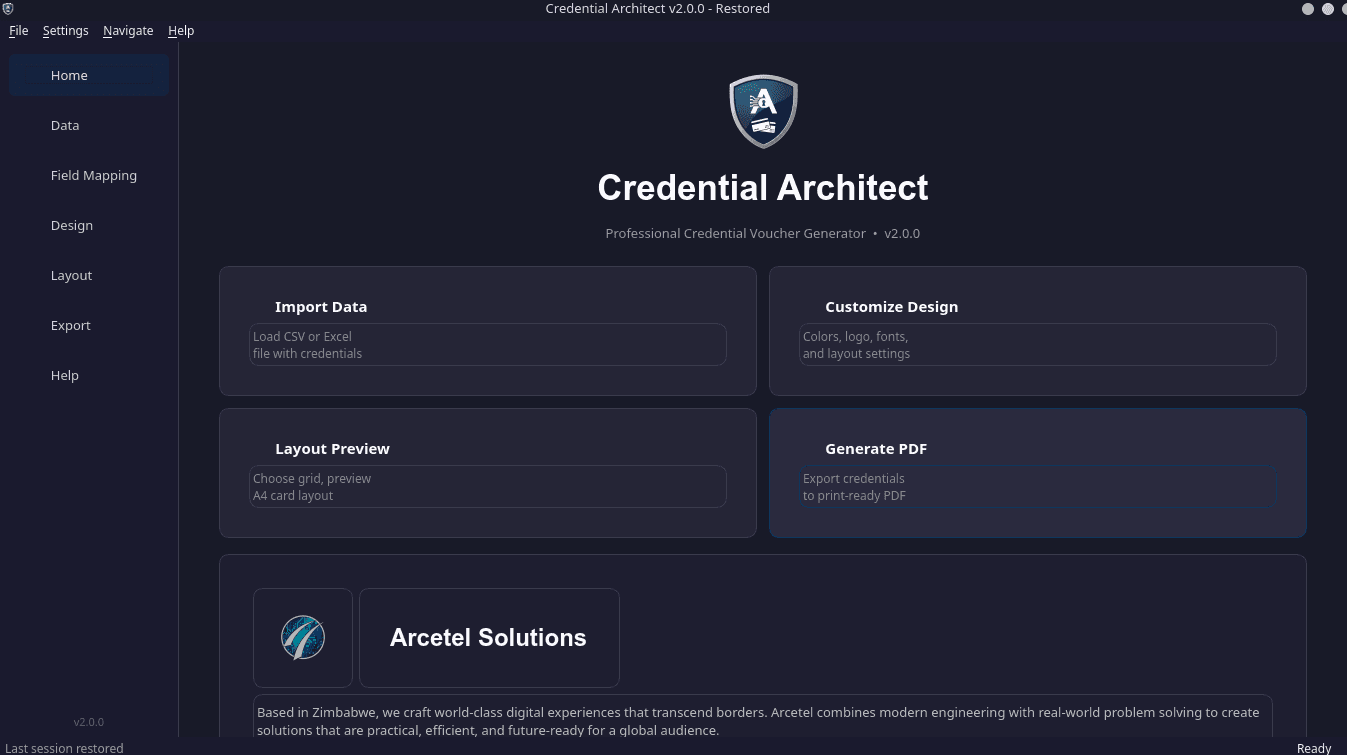
Home Panel

  • App logo (logo.png) displayed prominently
  • 4 quick-action cards: Import Data, Customize Design, Layout Preview, Generate PDF
  • Company branding section with arcetel-logo.png, description, contact details, tagline
  • Free software notice with invitation for suggestions

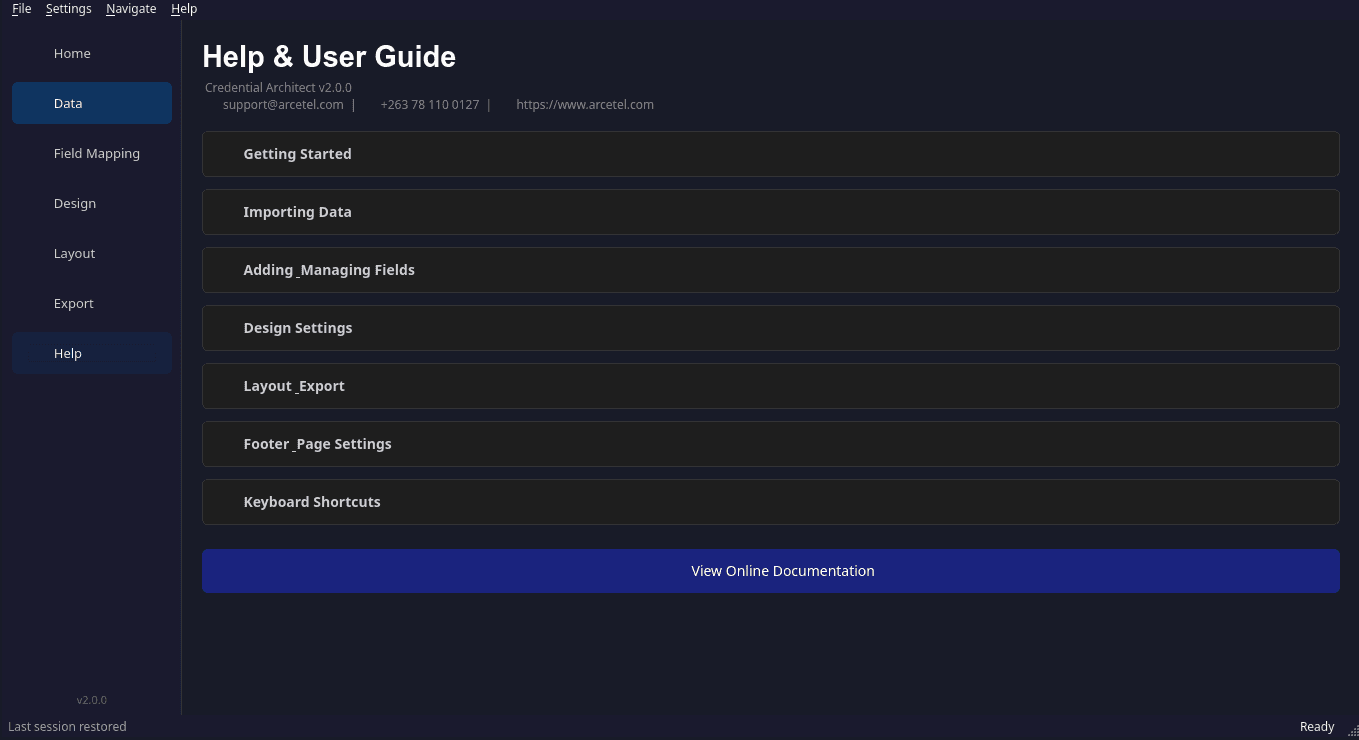
Help Panel

  • 7 collapsible sections: Getting Started, Importing Data, Field Mapping, Custom Fields, Design Settings, Layout & Export, Keyboard Shortcuts
  • Online documentation link
  • Contact and version info

Preferences

  • UI Theme selector
  • Default username/password labels
  • (Language and update checking removed for simplicity)

Settings (replaces "Project Files")

  • Save Settings (.casetting) β€” saves theme, layout, field mappings, custom fields
  • Load Settings β€” restore any saved configuration
  • No concept of "project files" β€” lightweight and portable
  • JSON-based format, human-readable

Cross-Platform & Packaging

  • resource_path() helper β€” assets resolve correctly in both development and PyInstaller-frozen builds
  • pathlib.Path everywhere β€” no string path concatenation, no hardcoded separators
  • No Windows-only APIs β€” os.startfile replaced with subprocess.Popen
  • PyInstaller .spec file β€” ready for Windows, Linux, and macOS builds
  • GitHub Actions workflow β€” automated builds for all three platforms on every push
  • requirements.txt (runtime) and requirements-dev.txt (linting/testing) split

Keyboard Shortcuts

ShortcutAction
Ctrl+1Home
Ctrl+2Data
Ctrl+3Design
Ctrl+4Layout
Ctrl+5Export
Ctrl+6Help
Ctrl+SSave Settings
Ctrl+OLoad Settings
Ctrl+QExit

Removed from v1

  • Monolithic generate.py β€” replaced by modular package
  • Tkinter/CustomTkinter β€” replaced by PySide6
  • Top-tab navigation β€” replaced by side nav
  • .caproj project files β€” replaced by lightweight .casetting settings
  • Language selector β€” removed until i18n is needed
  • Update checker β€” removed for v2 simplicity
  • Per-field bold/font-size toggles β€” centralised in Design panel
  • Appearance mode (dark/light combo) β€” replaced by UI Theme selector
  • File > New Project β€” removed (start fresh by just switching panels)

Technical Stack

ComponentChoice
LanguagePython 3.11+
GUIPySide6 (Qt6)
Datapandas, openpyxl
PDFfpdf2
ImagesPillow
Configpydantic-settings + platformdirs
QR Codessegno
PackagingPyInstaller
CI/CDGitHub Actions
Lintingblack, ruff, isort, mypy

Arcetel Solutions β€” Harare, Zimbabwe
The Arc of Intelligent Connection

πŸ“§ support@arcetel.com | πŸ“ž +263 78 110 0127 | 🌐 www.arcetel.com

v1.0.0

January 5th, 2026

0 downloads

WhatsApp Icon